Welcome to our WhatsApp community! The Moniheli WhatsApp community includes several groups, each with its own purpose. In this article you will find descriptions of the groups and instructions on how to participate in them.
Office
Article contents
What is the WhatsApp community?
The Moniheli WhatsApp community is a platform for representatives of member associations. It includes an information channel, a members’ discussion group, and several groups related to specific themes. As a member of the community, you can freely join any of the groups. You can also leave groups at any time.
If the WhatsApp community is new to you and you are not sure how to use it, you can book a time for digital support.
Link to the Whatsapp Community can be found in every Moniheli member letter, and also in the subscription confirmation to the member letter. Click the link below to subscribe to the member letter and access the community!
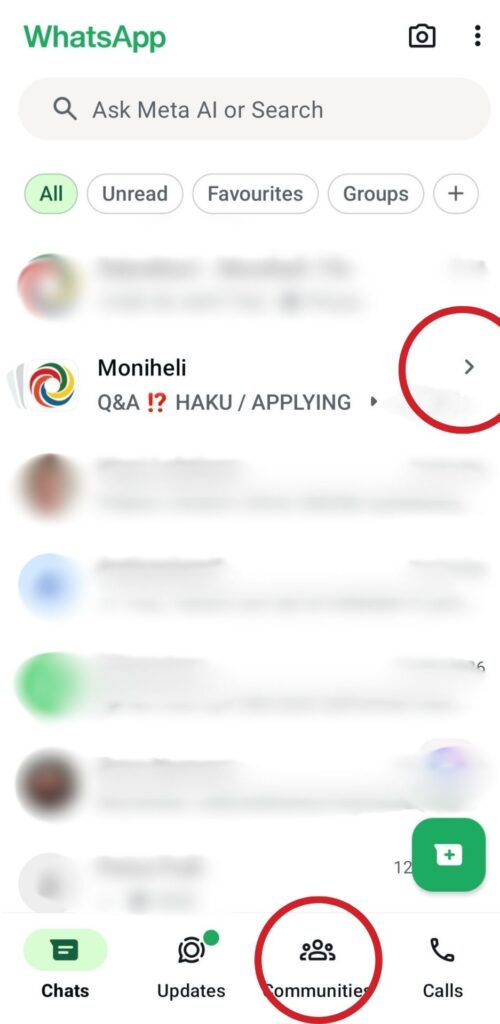
Here’s how to find the WhatsApp community and its groups in the chat view:
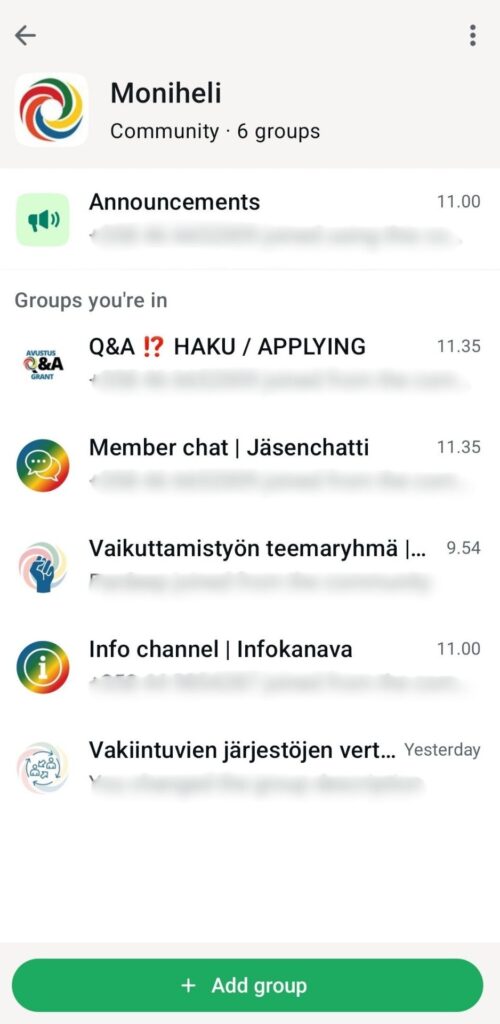
You can find the WhatsApp community in the chat view either by tapping the community icon at the bottom of the screen or by tapping the arrow next to a group that belongs to the community.
After selecting either option, you will see Moniheli’s WhatsApp community and the groups you belong to. Your view may look different if you are part of other communities or if you do not belong to all groups.
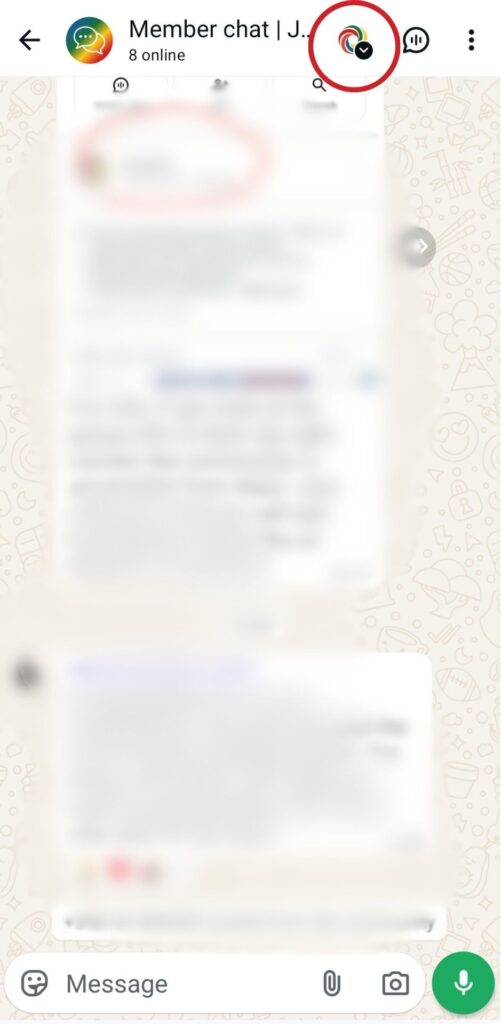
Here’s how to find the groups within a WhatsApp community when you are already in a community chat:
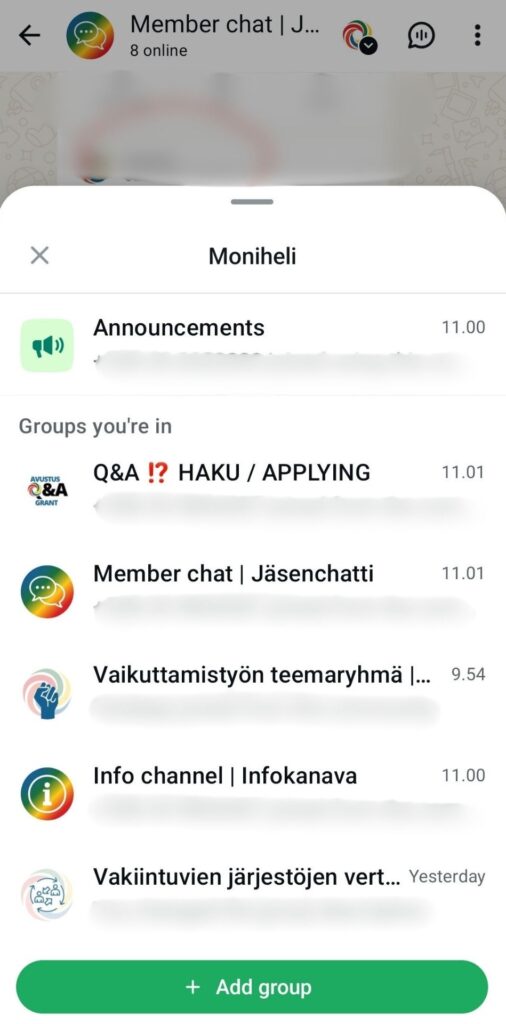
When you are in a WhatsApp community group, such as Moniheli’s member chat, you can easily find all groups within the community by tapping the arrow icon at the top of the screen.
After clicking the icon, you will see all the groups within the community and can join new ones.
General community rules
This community is not for pursuing private interests. Personal political campaigning, profit-seeking activities, or pressure to follow a specific religion or political direction are not allowed.
No hate speech, racism, or discriminatory language.
Respect the confidentiality of discussions.
Keep conversations respectful and professional.
Treat everyone first and foremost as individuals, not as representatives of groups.
The community is moderated by Moniheli staff. They have the right to remove content that does not follow the community rules. If you would like a new thematic group to be created in the community, please contact any of the moderators.
Who is the community for:
All actors from Moniheli’s member associations are welcome to join the WhatsApp community: board members, employees, volunteers, and others, regardless of their role.
What groups are available in the community?
There are two main groups in the community: Moniheli's info channel and Moniheli member chat. We share particularly important information on the Announcements channel. In addition, there are several thematic groups that members can join freely according to their interests. You can also leave groups at any time.
Moniheli's info channel
In this group, Moniheli shares information about trainings, events, and funding opportunities that are useful or important for members.
This group is intended for Moniheli to share information with members. Anyone may ask questions in the group.
If a member advertises their own activities in this group, Moniheli may move the message to the Moniheli member chat group and remove it from here if necessary, so that the structure of the channel remains clear.
Moniheli member chat
In this group you can:
Share topics related to your association work
Advertise your events and activities
Look for cooperation partners
Ask for help and advice
Discuss current topics
Contact the Moniheli team
Moniheli grant Q&A
This group is for all questions and answers related to Moniheli grants. Both organisations that already receive grants and those interested in applying can join the group.
Advocacy thematic group
A group for members interested in advocacy work.
Established associations peer group
This group is intended for people working in associations with paid staff, whose roles involve management, administration, public funding, or strategic development.
Add a username to the WhatsApp community
To make conversations smoother, we ask everyone to add their name in the WhatsApp community. This helps other members know who they are speaking with. Your name will only be visible in the community chats.
You can write, for example, your name and the name of your organisation.
How to add your name:
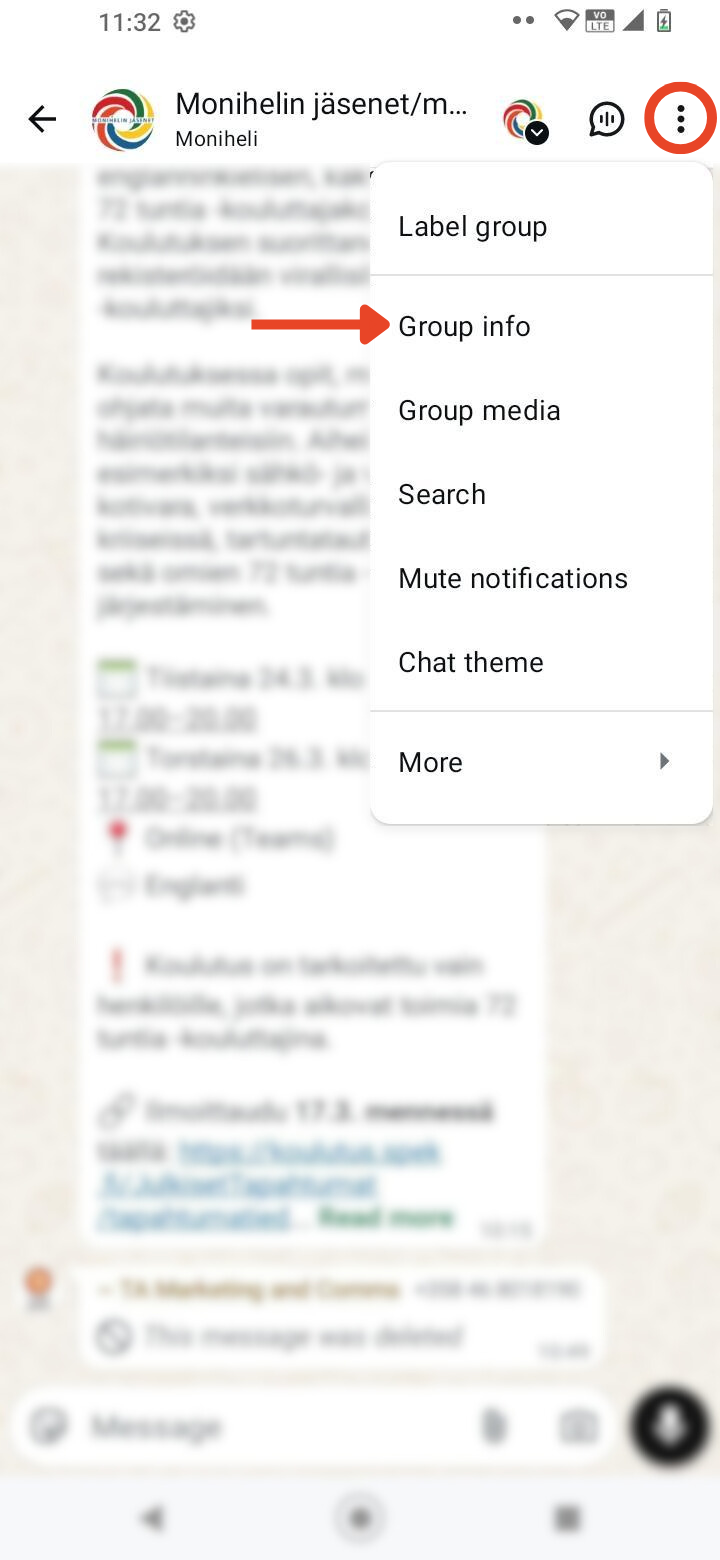
Open Group info.
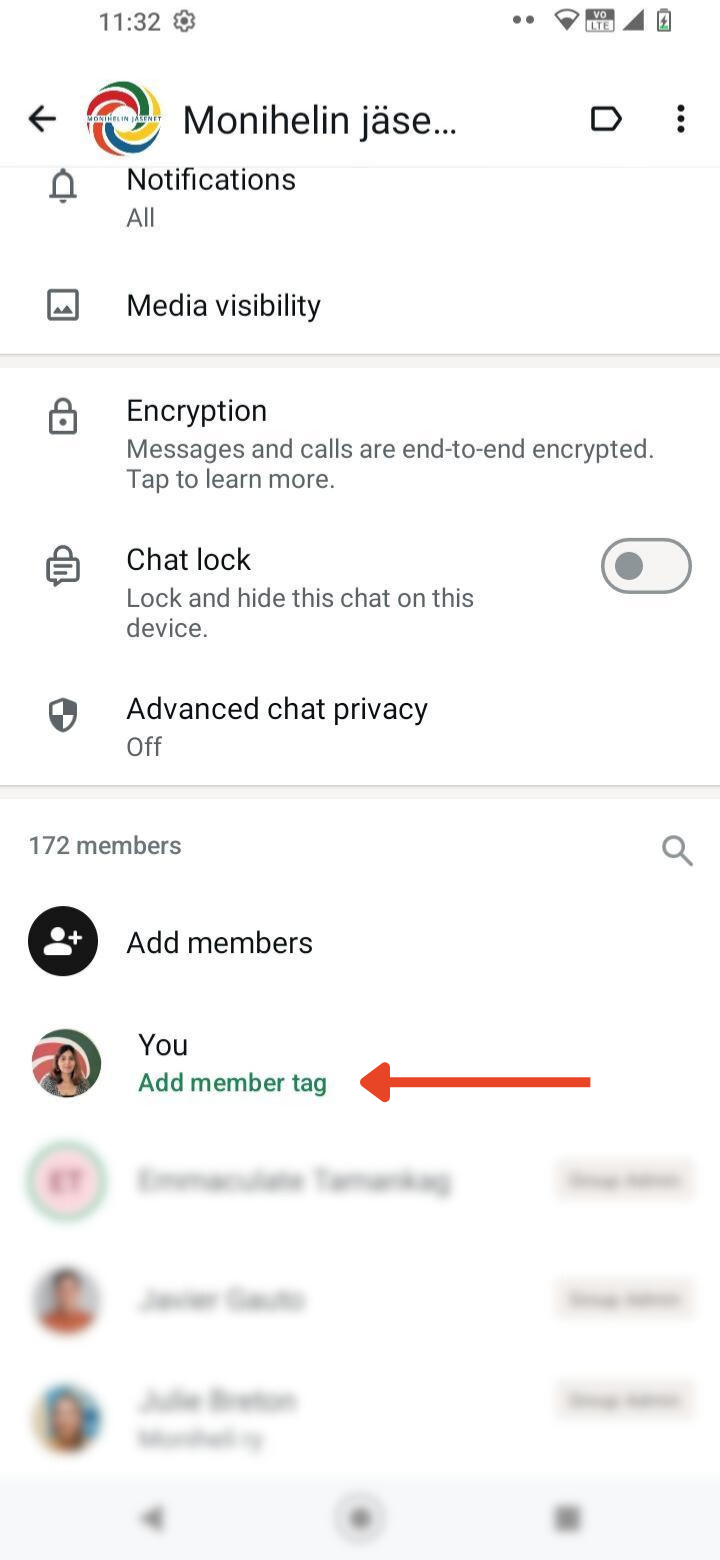
Click on your name.
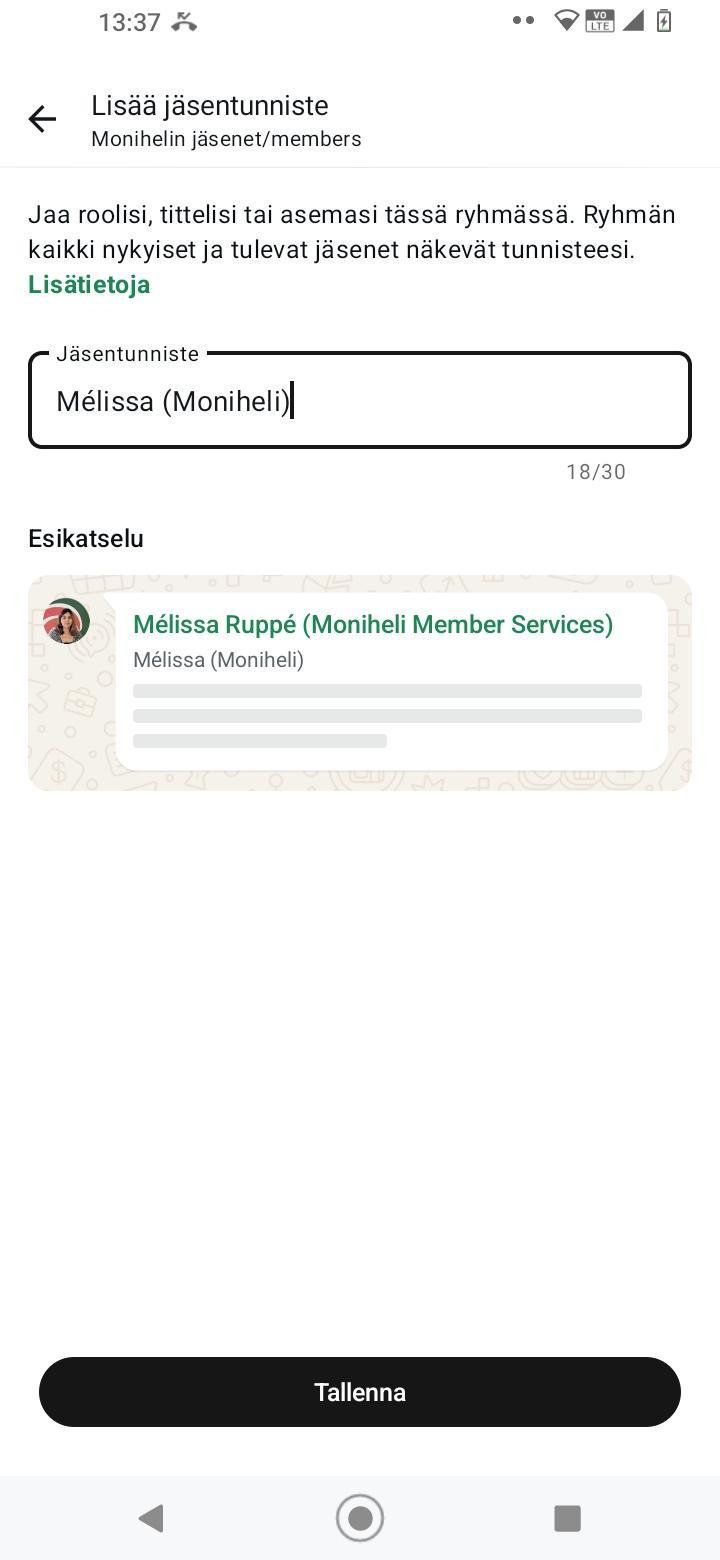
Write your name and the name of your organisation.
Save the changes.
Example: Matti (Example organisation)
You can see how to do this step by step in the images below.
1. Open Group info
2. Click on your name
3. Write your name and the name of your organisation
Verkkosivustomme käyttää evästeitä käyttökokemuksen parantamiseksi.
This website uses cookies to ensure you get the best experience on our website.